Home/Moonlit garden
Moonlit Garden Bead Pattern
A complete 44 × 20 square color panel with 880 filled cells. Review the composition, counts and construction limits before making your project.

Digital color preview · Square-grid layout
See the bead-by-bead layout
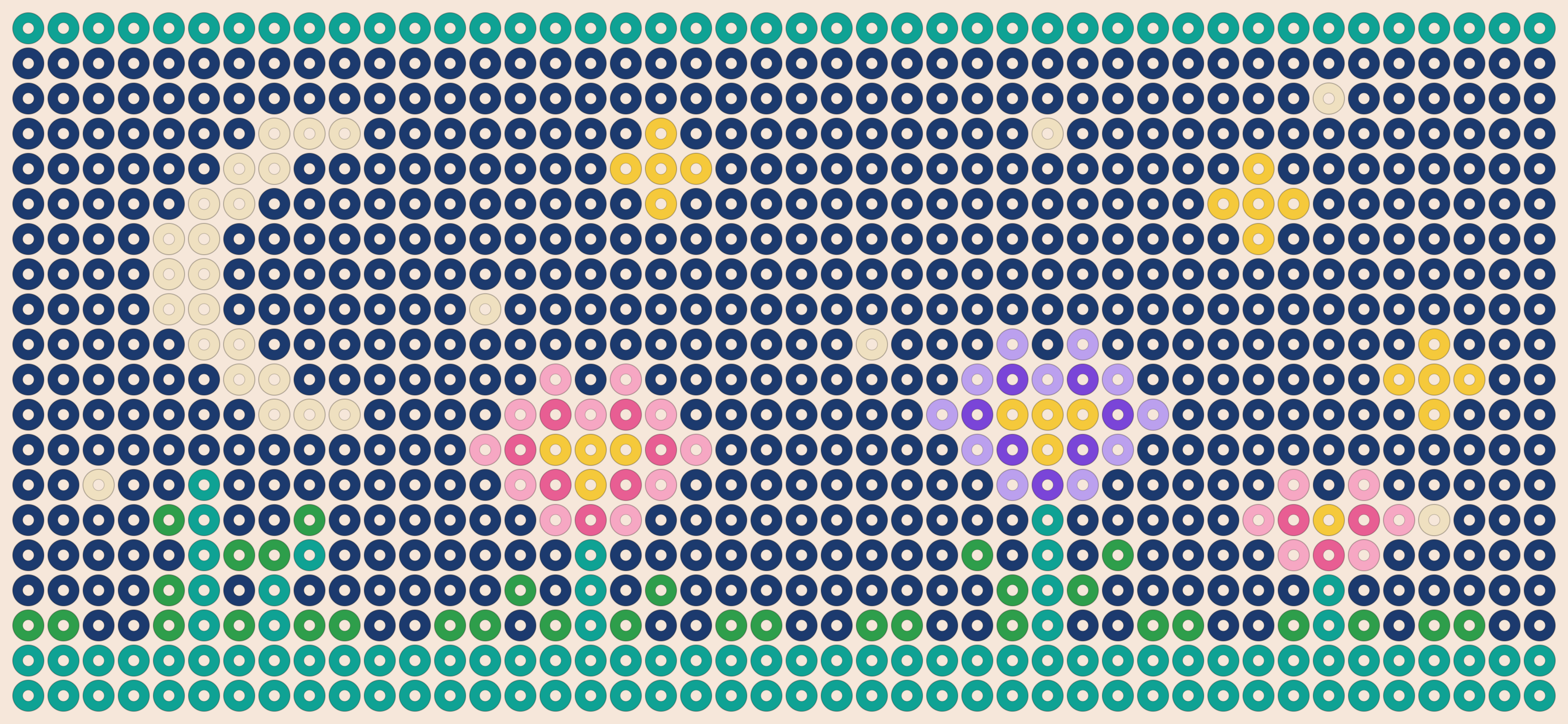
Moonlit garden
A cream crescent above pink and lilac flowers, with teal foliage running along the lower edge.
Keep the navy background for contrast, or replace the flower colors to match your stash. This is a complete scene, not a repeating tile.
| Bead | Symbol | Qty |
|---|---|---|
| Navy | N |
604 |
| Teal | T |
149 |
| Green | G |
32 |
| Cream | C |
26 |
| Yellow | Y |
24 |
| Light pink | L |
17 |
| Lilac | U |
11 |
| Pink | M |
10 |
| Purple | P |
7 |
| Filled cells | 880 | |
Counts exclude any background you add. Unfilled positions do not automatically mean beads can be omitted from a woven construction.
Recolor individual beads, then download the PNG, PDF or bead list. This color layout does not specify a stitch or finished wrist size.
Plan this complete panel
The moon, flowers and dark field form one complete scene. Keep the moon and its surrounding sky together when choosing a crop. This layout is not a seamless horizontal tile; duplicating the whole panel creates a repeated border and a second scene.
Keep the original dimensions when you want this exact scene. If a measured project needs fewer columns, first decide whether to create a different composition. Shrinking the picture can remove small flowers, and cutting a strip off one edge can unbalance the moon. A narrow motif from the pattern collection may be a better starting point.
Choose colors from your own supplies
Preserve a strong light-to-dark difference around the moon. For a softer palette, change one flower color at a time while leaving the sky dark enough to separate the petals. Check each changed color against your actual beads; similar pale shades can merge at a distance.
The table above comes from the same cell data used by the editor and downloads. Its letters are internal chart symbols, not manufacturer SKUs. Compare the named color and actual bead finish before buying; screen colors are approximate.
Filled cells, backgrounds and extra materials
This chart contains 44 × 20 = 880 positions. It has 880 filled cells and 0 unfilled positions. The original complete panel already assigns a color to every position, including the background and border.
If you erase cells or borrow only part of the picture, check the new unfilled count. Those cells become unassigned positions; they do not automatically become supported gaps in a woven construction. Use the editor’s background-fill action when the new chart needs a complete field.
The chart count excludes joins, decorative layers and any beads added outside the rectangle. For multiple copies, multiply each color separately, add your chosen spares, subtract usable stock and round up to the pack sizes you will buy.
Download the original chart or edit a copy
These direct files contain the original design shown above. To change colors or cells first, open the editor and download from there after editing.
Download original PDFDownload original PNGDownload color countsEdit this exact chart
Check printing before starting
The PDF uses A4 pages and ends with a color list. Inspect the first sheet and its symbols in print preview. For a larger reading grid, open the chart in the maker and select the 9 mm printed-grid option; it may create additional pages. That printed spacing does not predict the size of a finished cuff.
On US Letter paper, check for clipping and use your printer’s fit setting if needed. Scaling changes the printed grid dimensions. If using a monochrome printer, confirm that symbols are visible on the actual PDF; do not rely on grayscale alone to distinguish adjacent colors.
Choose the construction separately
This chart plans color placement. It does not show a stitch-specific thread path or guarantee a finished cuff size. It has not been physically test-built by us in a named stitch. Pick appropriate instructions, check their repeat and joining requirements, and measure a test strip with your materials.
The cuff calculator can help translate measured spacing into chart columns. It does not calculate thread length. The reading guide explains color symbols, coordinates and the information a stitch tutorial must supply.
Chart credits and sharing
This original design is published by Kandi Pattern Maker, with free editing and downloads for planning your own project. Share this page when you want someone to find the original files. To share an edited version, copy a new editor link; it contains a snapshot of that chart and is not a private-access system.
Compare related panels
- Twin koi — 48 × 20 positions, 7 colors
- Amber moth — 40 × 22 positions, 9 colors
Browse all 30 kandi ideas for smaller motifs and different themes, or return to the printable pattern collection.